See how your speakers really sound.
Sweep is a full measurement instrument for your Mac — frequency response, phase, waterfall, distortion, EQ design — with a companion that fits in your pocket, on iPhone, iPad, or Android. Free, and nothing ever leaves your machine.
Two ways in
You don't need to be an audiophile.
On first launch, Sweep asks what you're tuning. Say you've got a receiver with tone knobs, and a wizard measures for you — then hands back actual settings, not a chart to interpret. Want the full picture instead? That's the workbench below. Either way, switch any time — both read from the same library.
Sweep for Mac
The workbench.
One dark instrument window. Five views, each answering one question about your system — flip between them with a keystroke, and every measurement you've ever taken is one click away in the library.

Five views · five questions
Every tab answers one question.
Not a pile of charts — an instrument organized the way you actually think about a system.
What does it sound like? OVERLAY
Frequency response, overlaid — every measurement its own color. Spatial averaging across seats, A−B difference traces, per-channel sweeps, absolute SPL, zoom into any octave.
When does it arrive? PHASE
Wrapped phase and group delay from the same capture — are your drivers integrating, is the sub in step, is a crossover fighting itself? Arrival-time and polarity between two traces read out automatically.
How does the room ring? WATERFALL
Cumulative spectral decay — ridges running front-to-back are room modes still ringing after the signal stops. Adjustable window and span, honest about how much decay your capture actually stored.
What is the speaker adding? DISTORTION
Total harmonic distortion vs frequency, plus the H2 and H3 components — extracted from the same sweep via the Farina method, no second measurement needed.
How do I fix it? EQ DESIGN
Drag parametric bands on the chart and watch the predicted curve move — or let Auto EQ design against a Harman, B&K, or custom target. Export to miniDSP biquads or REW filters. Own a receiver with tone knobs instead? Tune My Receiver recommends actual knob positions.
Find the room mode. Fix it. Prove it.
Two traces — before and after a sub tweak. The null at 63 Hz fills in; the 42 Hz mode comes down. Relative response, doing the one job you actually need.
Sweep for iPhone and iPad
The rig fits in your hand.
The same honest engine, untethered — now literally. A line-out to your amp, or no cable at all: send the sweep to any AirPlay or Bluetooth speaker while your iPhone listens from the seat. A real Farina sweep in under a minute — the fast check you'll actually run between full sessions at the Mac.
On iPad — and on iPhone Duo, unfolded — the chart takes the whole screen. Your measurements and the controls sit in a side channel, the readout floats over the plot, and everything you know from the phone is exactly where you left it. Fold the Duo and the controls move into its side column; turn any iPhone on its side for a wider chart with your measurements beside it. Same app, same library, same one-tap sweep.
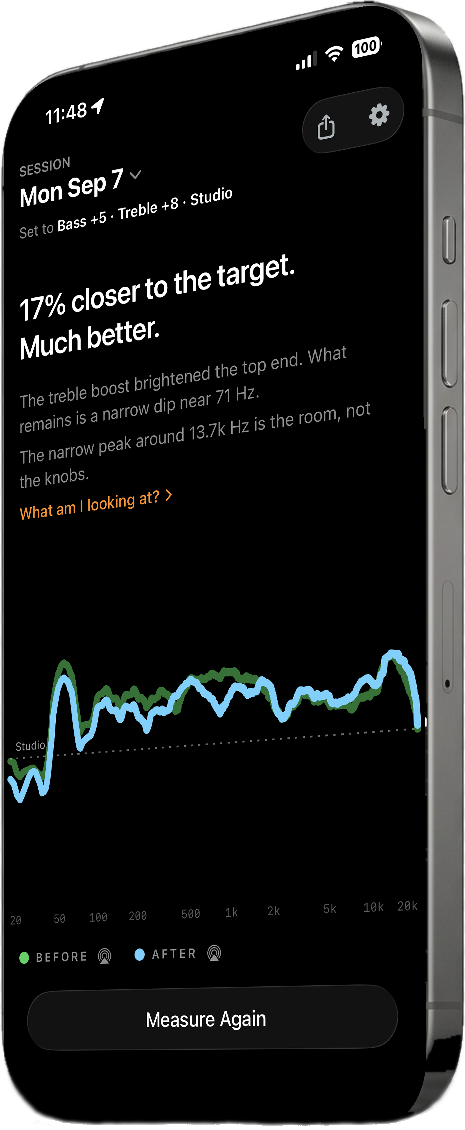

Sweep for Android
Same scout. Your phone.
Everything the iPhone app measures, built the Android way — Material design, the system share sheet and file picker — on the same engine as the Mac. The same sweep, the same math, the same honest limits drawn on the chart.
Android 10 or later.
Which Sweep?
All of them. They're free.
The Mac is the workbench; the iPhone, iPad, and Android apps are the scouts. Same engine on all of them — the Mac just has more instruments pointed at the same capture.
| Mac | iPhone / iPad | Android | |
|---|---|---|---|
| Frequency response · overlays · share | ✓ | ✓ | ✓ |
| Calibrated mics (iMM-6C, UMIK, .cal) | ✓ | ✓ | ✓ |
| Wireless output (AirPlay · Bluetooth) | ✓ | ✓ | Bluetooth |
| Phase & group delay | ✓ | — | — |
| Waterfall (CSD) | ✓ | — | — |
| Distortion (THD · H2 · H3) | ✓ | — | — |
| EQ Design + miniDSP/REW export | ✓ | — | — |
| Tune My Receiver (guided) | ✓ | ✓ | ✓ |
| Spatial averaging · A−B differences | ✓ | ✓ | ✓ |
| Handoff (send/receive a capture) | ✓ | ✓ | — |
| Sweep files (open on any Sweep) | ✓ | ✓ | ✓ |
| Price | Free | Free | Free |
Not a lab. Not a guess.
An in-room measurement has limits — the deep bass belongs to your room, and a gate can only vouch for so much. Sweep draws those limits right on the chart. Every trace carries its provenance too — built-in mic, wireless output — labeled on its face, so a quick check never masquerades as the calibrated rig. And when a capture can't support a number — a polarity call, a longer decay span, a phase curve past what was stored — it shows nothing rather than guessing.
Privacy
No account, no ads,
no internet needed.
Sweep is an app, not a service: your measurements are ordinary files on your device, and everything it does — the sweep, the math, the charts — happens right there. The one exception is one you control: Handoff lets you send a capture to a Mac you've paired and approved yourself — still device to device, still no server, still no internet.
On Android, Sweep doesn't even ask for internet access, and a Sweep file goes only where you send it from the share sheet.
This page serves as the privacy policy for the Sweep apps on Mac, iPhone, iPad, and Android.
Measure like you mean it.
Free on Mac, iPhone, iPad, and Android. Everything that's free today stays free — no account, no ads, no subscriptions.